Lightweight, local-first code editing inside a Chrome tab
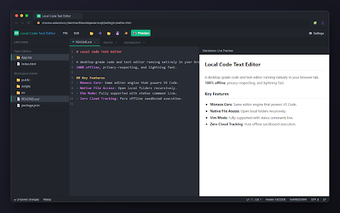
Local Code Text Editor, developed by Oli Apps, is a browser extension that brings a lightweight development environment to Chrome for fast local editing. It offers an editing surface, local folder access, and offline operation to edit files without leaving the browser. Key elements include syntax highlighting, auto-save, and a high-contrast dark theme for extended sessions. The tool targets developers and students who need a privacy-focused, low-friction editor inside their browser.
What the editor is built to do for quick, local projects
The app is designed as a compact development workspace that runs inside a browser tab and opens folders from the machine, making it suitable for short coding sessions, script tweaks, and classroom exercises. Its design emphasizes staying within the browser rather than switching to a desktop IDE, which matches users who prefer small, focused edits without installing additional software.
How it behaves during active editing sessions
Typing responsiveness and file handling are practical strengths because the editor operates locally, producing near-instant reactions for keystrokes and saves; the product notes zero latency for typing and file operations. The interface supports multiple open files in tabs and an auto-save feature that reduces interruption risk during iterative edits.
How it treats privacy and local data control
Data sovereignty is explicit
Customization and niche workflows it supports
Power-user options are available
A practical pick for local edits, with clear trade-offs
Local Code Text Editor is a purposeful option for developers and students who want a browser-based, privacy-oriented editing environment, supported by a perfect user rating on the Chrome Web Store. The trade-off is that it is optimized for local workflows and short sessions rather than replacing a full desktop IDE for large refactors. Consider it a portable, low-friction editor for quick tasks and learning exercises.